GooseWrap Studio
Design a vehicle wrap in 3D and print the installer pack. Pick a car or sign, the app finds the panels, you add colour, film, tint and logos. Then it gives you a proof, a material list, a cost estimate, a PDF pack for the installer and a short promo video.
From a 3D car to a cut list
One tool from first idea to install day. The shop designs it, the client sees it, the installer gets exact sizes.
Pick a vehicle
Choose one of 45 cars or 10 signs from the library, or load your own .glb or .gltf file.
Check the panels
The app cuts the body into real install panels. Read the report, fix any panel by hand and save it.
Add colour and film
Click any panel on the car and give it a colour and a finish. Every panel can be different. Tint the windows and colour the trim, rims, calipers and lights.
Add artwork
Place text, logos, stripes and door templates. Artwork copies to the matching spot on the other side and can run across a whole side.
Show the client
Export a PNG proof, or make a promo video for WhatsApp in a lot or showroom set.
Hand over to the installer
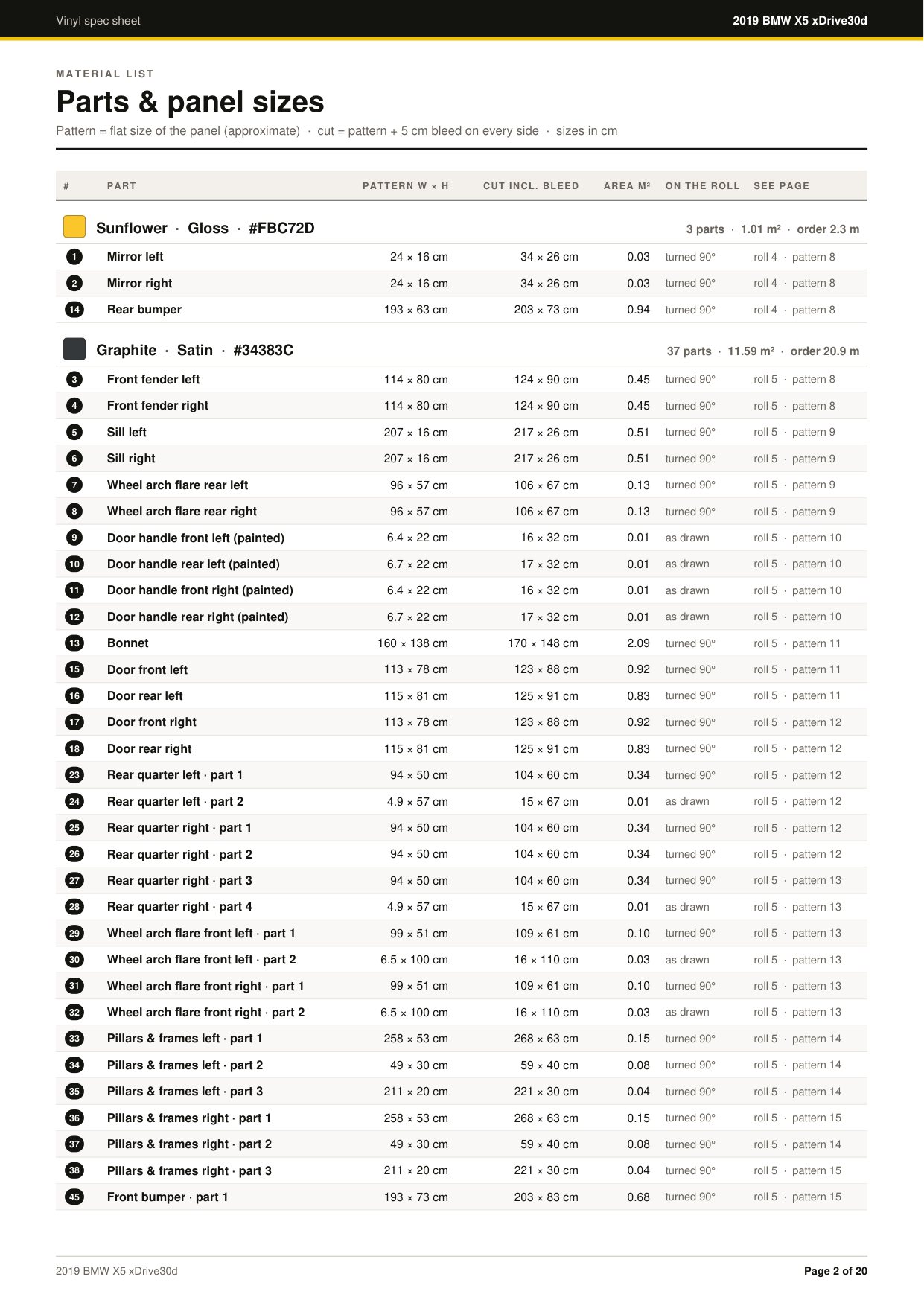
Download the PDF pack: film to order, roll layouts, cut patterns, a cost estimate, a checklist and sign-off lines.
Promo films, straight from the browser
Every clip here is the same BMW X5, wrapped six ways. No video editor needed. Pick a set, a light mood and a camera path, and the app records an H.264 MP4 frame by frame.
- 5 camera paths
- Drive in and out, slow 360 orbit, low hero sweep, drive-by and a 4-angle showcase.
- 2 sets, 3 moods
- An industrial lot with wet asphalt at night, or a showroom with a mirror floor. Golden hour, day or night.
- Sized for WhatsApp
- 1080p MP4, 720p under 16 MB for WhatsApp chat, or vertical 1080 x 1920 for Status and Reels.
- 10 to 45 seconds
- Wheels roll as the car drives, the car reflects the set, and the shadow follows it.
It finds every panel for you
A 3D car file is just a pile of triangles. GooseWrap works out where the bonnet ends and the fender starts, the way an installer would cut it.
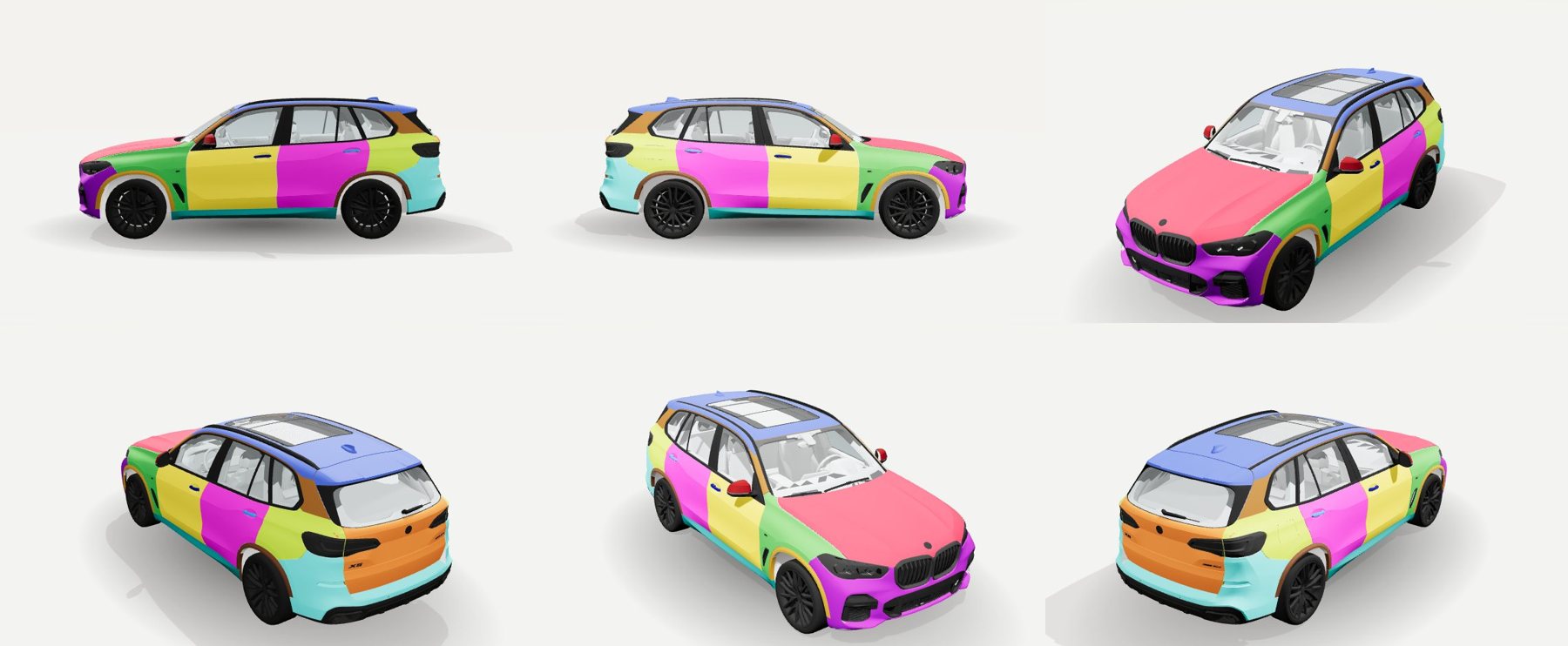
- Real install panels
- Bonnet, roof, tailgate, bumpers, fenders, doors, quarters, pillars and sills, left and right, with matching lines on both sides.
- Fits each car
- The app measures axles, wheel size, beltline, roofline, windscreen and B- and C-pillars, so panel lines fit that car.
- Small parts on their own
- Door handles, arch flares, sill strips and mirror caps become their own pieces. Panel edges follow creases and shut lines.
- Bakkies, vans and trucks
- Library bakkies get a cab back wall, bin sides, bin inside and tailgate. Cab-over trucks and vans are spotted from their shape and get a front face panel.
- Glass, lights and trim
- Glass per window, lights per lamp, and trim split into rails, wipers, plates, badges and arch trims.
- Fix a panel with a brush
- If a panel is not quite right, paint over it with a brush, from fine to very wide, or click whole pieces into the right panel. It works like paint: you see the change at once. Save it and that car opens right every time.
Everything it recognises
Lights
- Headlights, tail lights, fog lights front and rear, each left and right
- A high third brake light on the tailgate or roof
- Side indicators and repeaters
- Clear parts low at the nose or tail are treated as lamp lenses, not windows
Glass
- Windscreen, rear window and roof glass
- Front door, rear door, front quarter and rear quarter windows, each side
- Mirror glass split from the mirror base
- The end of the rear door is measured, so door glass and quarter glass split in the right place
- Anything see-through is glass, or a lamp if it is red or amber
Trim and small parts
- Window frames, side skirts, wheel arch trim at each corner
- Door handles, painted or chrome, front and rear
- Front and rear number plates, and front, rear and side badges
- Upper grille and lower grille with splitter, rear diffuser, exhaust area
- Roof rails and roof edge strips, antenna and roof trim, wipers and scuttle
- Tow bars, bull bars, side steps and cladding, read from part names
- A badge in the middle of a wheel becomes the rim centre cap
Wheels
- Every wheel gets a rim, tyre, brake caliper and brake disc, at each corner
- Anything painted inside a wheel counts as wheel, never as bodywork
- A wheel part named for the wrong corner moves to the corner it sits in
- Twin wheels or a third axle give a warning and use one wheel per corner
- Paint inside the arches and under the sills goes to the arch or sill piece
Left and right
- The two sides are compared triangle by triangle, so both end up with the same panel lines
- A part named left that sits on the right is moved over
- Names are read in English, German, Spanish, Portuguese, French, Italian and Russian
How panels are cut
- Roof, bonnet, bumper and fender lines are tied to each car's own wheels, glass and roof height
- The beltline follows the window line over the doors, and ignores window handle dips
- Small pieces bounded by seams stay whole, and tiny strays merge into their neighbour
- In Pro + sub-parts each panel is cut again at creases into up to 8 numbered parts
- Coarse mode groups panels into front, cab, rear, roof, bonnet, lower and bin
Hidden and inside paint
- A part that shows less than 20% from outside is dropped whole
- Paint that faces the ground or the cabin is dropped
- Named doors, quarters and fenders lose their inner skin
- Hidden trim and fixtures stay factory
Your own models
- Front and back are guessed from lamps, red tail lenses, glass and roofline, and a Swap button fixes a wrong guess
- 2-door or 4-door is read from the file name
- Wrong units are corrected to a believable car length
- A model standing on its nose is turned onto its wheels
- Moving parts are baked to a rest pose, and nuts and bolts are split per wheel
- Save the model on the server and its fixes and saved results work like a library car
Warnings and safety nets
- Plain warnings for: no wheels or fewer than 4, more than 4 wheels, a model not on its wheels, no windscreen, no side glass, and a saved fix from an older version of the model
- If the main detector fails, it falls back to a simple position split instead of breaking
Speed and memory
- Detection runs on the graphics card in the browser, and shows how long it took
- Results are saved per vehicle, and a change to the detector re-runs detection
- After a hand fix the same result is reused, not run again
Hand-fix tools
- Shift-click to pick the part to work on, Ctrl+Z to undo, Escape to stop
- Send any piece to "Not part of the wrap" to leave it factory
- Add and delete custom parts, and reset all fixes
- Piece mode picks a seam-bounded piece, joined across soft bends
- Fixes save on the server per vehicle, or as a file you can open again
We audited 50 cars
Fifty models were rendered from six angles and checked panel by panel. The review found 562 errors, all traced to 10 root causes. Then we fixed the causes, not the cars.
Twin faces broke detection
Some models have every triangle twice, back to back. The panel finder paired each triangle with its own copy. After the fix, the Peugeot 508 went from 70,736 one-triangle scraps to 1,089 real pieces, and the X5 M from 14,822 patches to 1,140.
Select a panel. Colour it.
Every panel on the car can be coloured on its own, like painting a model. Click it, pick a colour, a finish or a film, and the car changes at once.
- Click the panel
- Click a panel on the 3D car, or pick it from the parts list. Bonnet, roof, each door, each bumper, mirrors, handles and trim are all separate.
- Pick the look
- Choose a colour, a finish like gloss, satin, matte or chrome, or a real film. The panel updates straight away.
- Do several at once
- Shift-click or Ctrl-click to select more panels. Group buttons pick a whole set. Quick schemes colour the whole car, the bonnet and roof, or the doors only.
- Draw your own area
- Drag a box on the car to make a new colour zone. You can merge zones or delete them.
- Undo anything
- Undo and redo up to 50 steps. Reset one panel, or the whole car, back to factory. Your artwork stays.
The brush is only for fixing the automatic panel lines, if a panel needs correcting. You do not need it to colour a panel.
How we work out the cuts
Most wrap tools stop at a pretty picture. GooseWrap measures every panel and tells you how many metres of each film to order, and how to lay it on the roll.
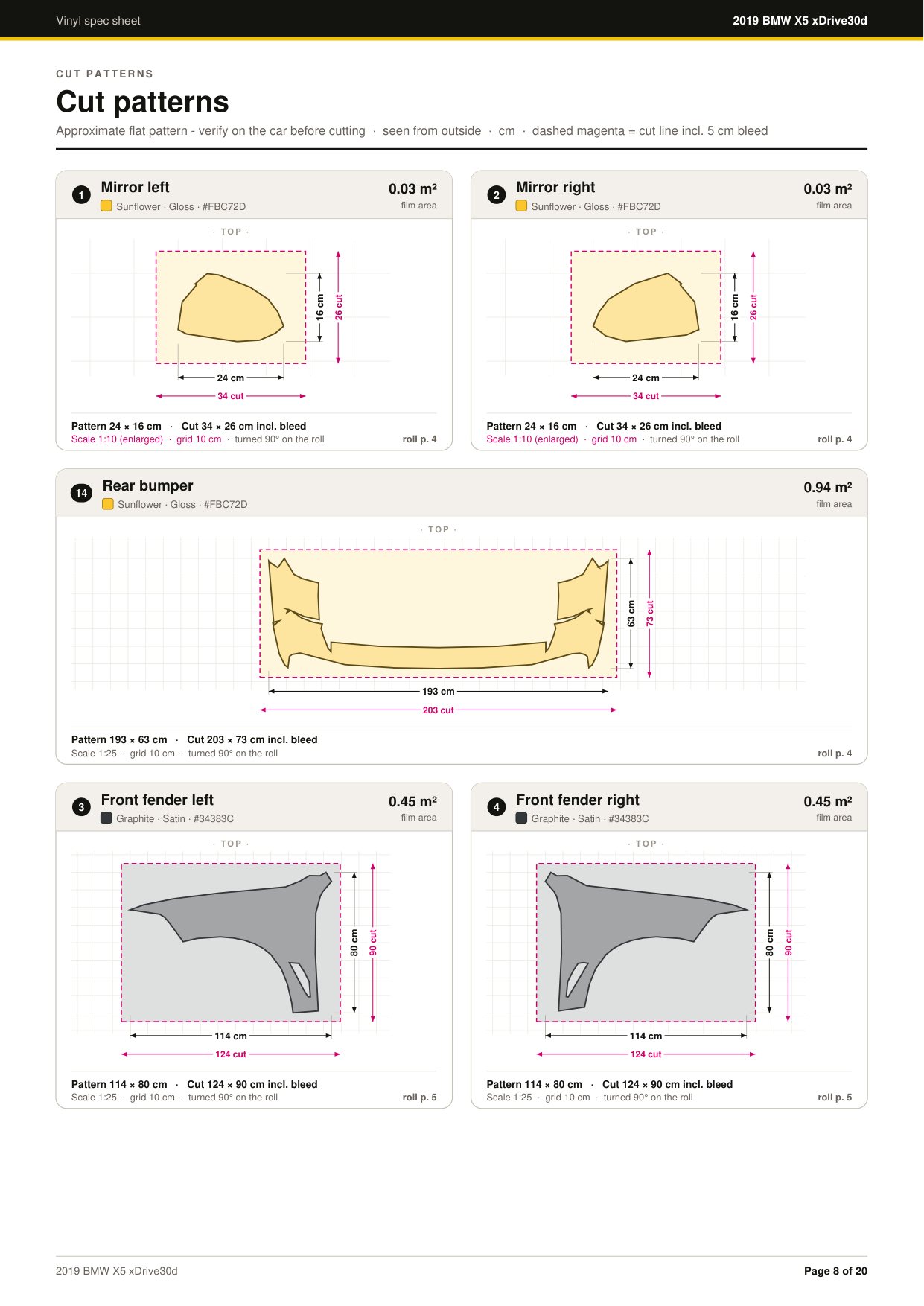
- Measure. Each panel is measured flat from the 3D model. The outer 1% at each end is ignored, so stray triangles cannot inflate the size.
- Match. Left and right twins, like the two front doors, both get the larger of the two sizes, so nothing is cut short.
- Trace. The panel is laid flat and its outline traced to about 4 mm. Holes like a handle cut-out stay in the pattern.
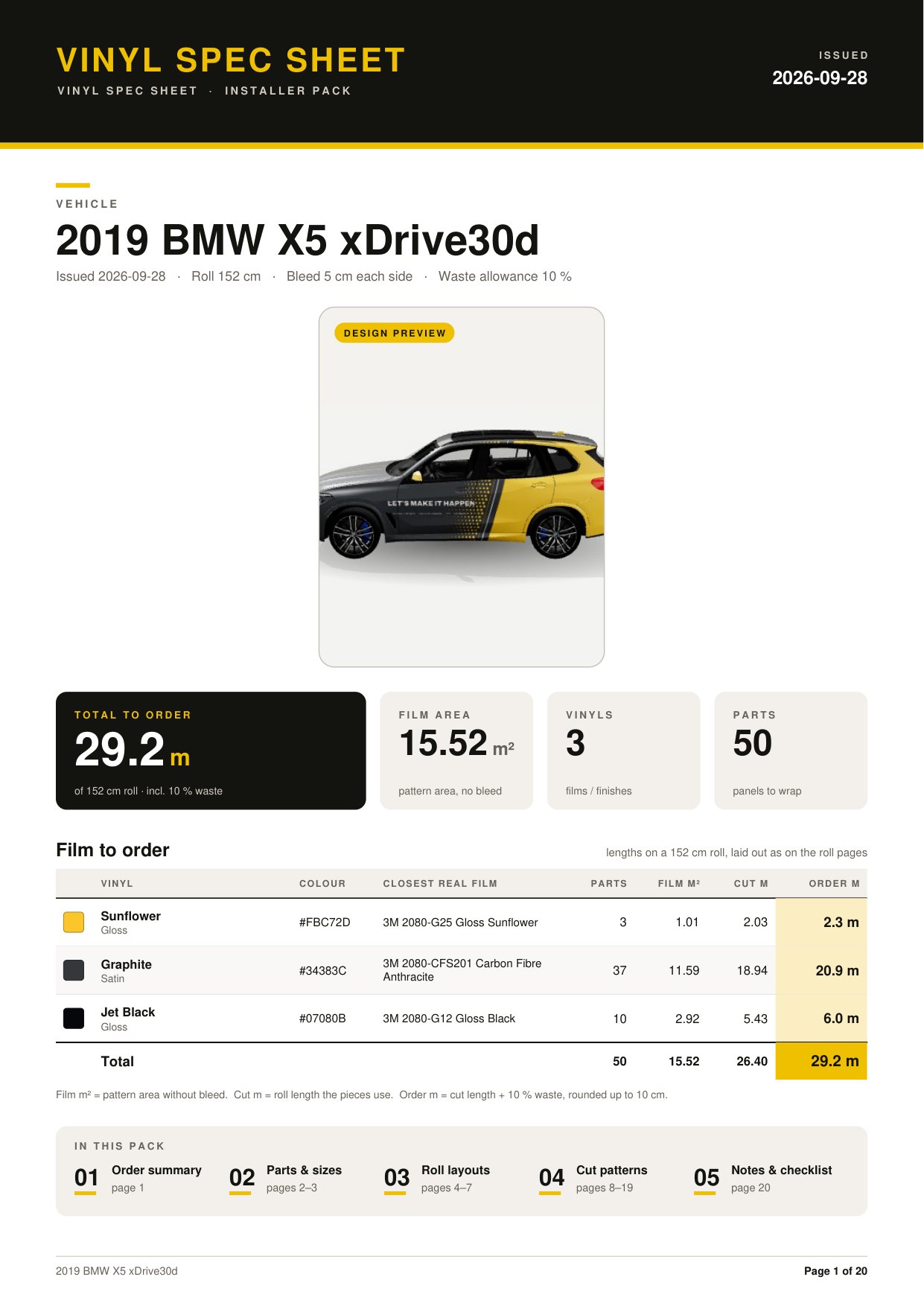
- Bleed. Every part gets 5 cm extra film on every side.
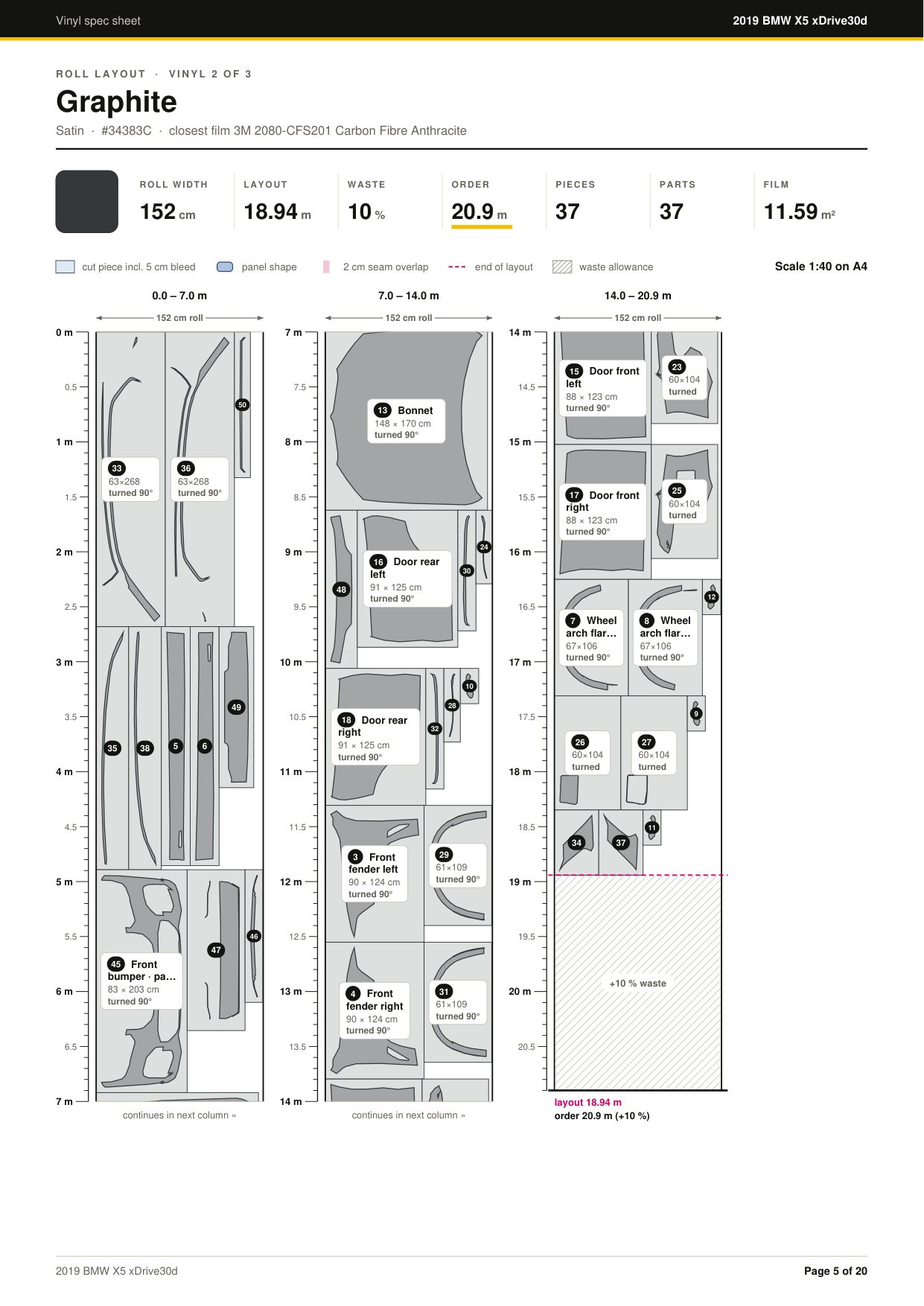
- Turn. Each piece is turned so its short side runs across the roll. The sheet says "turned 90°" so the installer knows.
- Split. A piece too wide for the roll is cut into numbered strips with a 2 cm seam overlap.
- Pack. Pieces are sorted longest first and placed side by side in rows across the roll.
- Order. Film needed plus 10% spare, rounded up to 10 cm. One order per vinyl.
29.2 m of film, 50 parts, 3 vinyls
15.52 m² of film on the car. The satin graphite alone is 37 pieces packed on a 152 cm roll: 18.94 m of layout, 20.9 m to order.
1.37 m to 5.00 m
Roll widths of 1.37, 1.52, 1.60, 3.20 and 5.00 m. Signs switch to print mode and a 3.2 m roll by themselves.
Films that look like the real thing
Each finish is its own material, not a colour filter. Chrome is a true mirror, pearl shimmers, and colour shift changes with the viewing angle.
Glass, trim, wheels and lights
- Window tint at six light levels, from factory to 5% limo, in Smoke, Graphite, Bronze, Blue or Green
- Chrome delete in gloss, satin or matte black, or match the wrap
- Rims in black, gunmetal, bronze, silver, white or any colour, one wheel or all four
- Brake calipers in red, yellow, blue, orange or black
- Light or dark smoked film on the lamps
- One-way vision window print: 50/50 to 20/80 open area, true-scale holes
Shade names are our own and screen colours are a preview. Always check a real swatch.
Logos, text and full-side graphics
Drag artwork right on the 3D car. Mouse wheel sizes it, Shift turns it, Alt stretches it.
- Up to 50 layers
- Text in 5 fonts, logos in PNG, JPG, WebP or SVG up to 100 MB, stripes and shapes.
- Mirrors to the other side
- Artwork lands on the matching spot on the other side as a linked twin. Pictures face forward on both sides and text stays readable.
- Across a whole side
- Run one graphic over a whole side, the front, rear, top, or the whole vehicle.
- 10 door templates
- Business, Motorsport and Lifestyle. Fill in name, tagline, website, number and colours.
- Client site in 360
- Load a 360 photo of the client's yard and park the car in it, with matching reflections.
- Billboards too
- 10 real-size signs, from a 14.6 x 4.3 m bulletin to a street lightbox and a totem.
The full feature list
More than 140 features, grouped by area.
Show all features
Vehicles and signs
- 45 ready-made 3D vehicles from 13 brands: SUVs, sedans, hatchbacks, wagons, coupes and bakkies
- Search by name or type, grouped by brand
- 10 real-size signs: bulletin, three-sided monopole, roadside billboards, lightbox, totem, poster case
- Load your own .glb or .gltf, by file picker or drag and drop
- Imported models fixed on load: rest pose, stand on wheels, shared wheel parts split
- Save an uploaded vehicle on the server for the whole team
Panel detection
- Six modes: Pro, Pro + sub-parts, Coarse, Classic, Named parts only, Whole vehicle
- Sub-part crease angle from 15 to 70 degrees
- 41 views to keep interior and hidden paint out
- Seats, door cards, floor, headliner and door shuts left out
- Wheels found by names, round shapes or ground contact
- Wrongly named rim, tyre or brake parts moved to the right place
- Window line traced in 48 slices
- 2-door and 4-door layouts
- Paint inside arches and under sills wrapped too
- Report: wheels found, left/right match, doors, hidden paint skipped, detection time, plain warnings
- 20-colour panel map
Fixing panels
- Brush from 0.5 to 60 cm, or click whole pieces
- Named custom parts and a magic wand
- Undo each fix
- Save a fix per vehicle on the server, or as JSON
- Detection results cached per vehicle so big models open fast
Colour and film
- 136 shades, 10 families, 7 finishes, 952 swatches
- Search by name or HEX, filter by family or finish
- Clearcoat, metal chrome, angle-shift pearl and colour shift
- Quick schemes: full wrap, bonnet + roof, doors only
- Drag a box to make a new colour zone
- Undo and redo up to 50 steps
Proof and material list
- PNG proof up to 8192 px
- Live list: part size, film m², closest 3M film, metres per vinyl
- Roll widths 1.37, 1.52, 1.60, 3.20 and 5.00 m
- 5 cm bleed and 10% spare
- CSV download and a print-ready A4 check sheet
Installer PDF pack
- Made in the browser, with bookmarks and page numbers
- No GooseWrap name or logo on any page, so the shop can hand it over as its own
- Cover with render, stats and film to order
- Parts table grouped by vinyl
- Roll layouts to scale with ruler, seams and waste
- Strips with 2 cm overlaps for oversize parts
- Cut pattern per part on a 10 cm grid
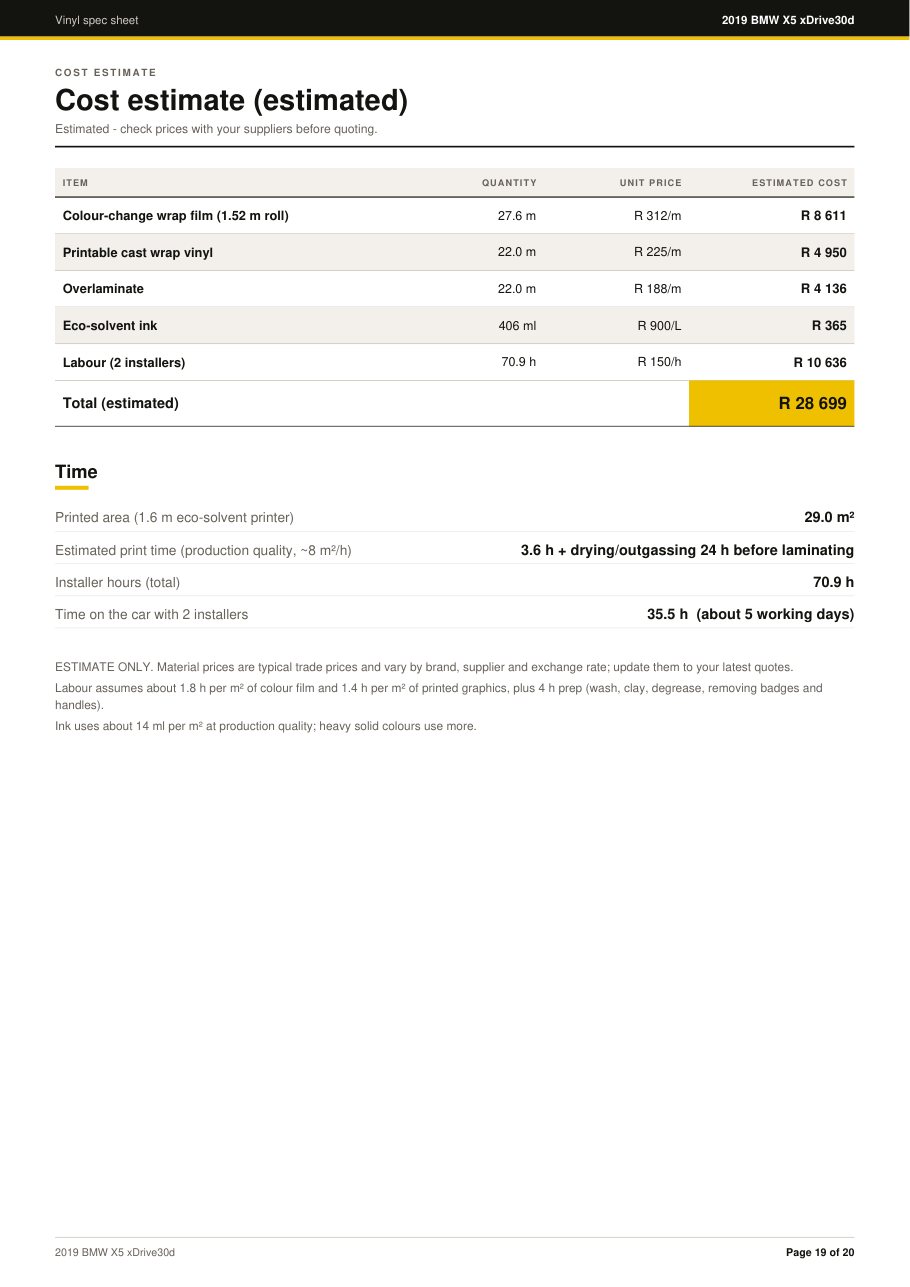
- Cost estimate: film, print vinyl, laminate, ink and labour for 2 installers, with print time and days on the job
- 9-step checklist, film batch record, sign-off lines
Promo video
- 5 camera paths, 2 sets, 3 light moods
- 1080p, WhatsApp 720p under 16 MB, or vertical 1080 x 1920
- 10, 15, 20, 30 or 45 seconds
- H.264 MP4 made in the browser, hardware encoder when available
- All set textures made in code
Viewer and scene
- Orbit, zoom to cursor, five camera presets, turntable
- Studio, dark hall, blueprint grid, warehouse or your own photo
- 360 photo of the client's site with reflections
- Length, width, height and film area on screen
Projects and access
- Save projects on the server up to 100 MB, or as JSON
- Project list with vehicle and save date
- Login required, password stored hashed
- Works on phones: viewer on top, controls below